Rules + workflow
Turn business policy into automated workflows: rules, calculations and human review
Miji turns a written policy into a workflow that runs it. The policy becomes versioned rules and decision tables; the numbers it depends on become exact calculations and lookup grids; the cases it cannot decide go to the right people; and every run records which version of the policy answered. Rules, calculations, data, human review and the record live in one platform, so they cannot drift apart.
Business teams edit the policy; the workflow applies it the same way every time.
In short
- Rules as conditions or as a decision table — two views of one versioned policy.
- Conditions compare a field with a value, another field, or an expression.
- Effective-dated lookup grids for rates, limits and thresholds.
- Approval gates and work queues for the cases the policy refers.
- Test and production environments, with deployments pinned to versions.
From a policy document to a running workflow
- 1
Write the policy as rules
Each outcome is a branch; each branch has conditions. The same rule reads as a condition tree or as a decision table — whichever your team reads faster.
- 2
Put the numbers in tables
Limits and prices live in lookup grids selected by several columns at once, with effective dates, so a new rate sheet is a table edit.
- 3
Calculate exactly
Ratios, payments and maximums run with exact decimal arithmetic and built-in finance functions.
- 4
Connect the data
Forms, webhooks, schedules and API calls start a run; around 30 connector templates and your own HTTP endpoints fetch and send data.
- 5
Decide who reviews
Threshold routing sends cases to an approval group resolved by any one, all, or a majority, and people work them from a queue.
- 6
Test, then deploy
Try a rule against sample inputs, run the workflow in a test environment, and deploy a pinned version to production.
The rules engine
A Miji rule is a list of outcomes, evaluated top to bottom; the first whose conditions match wins, and a default catches the rest. A condition compares a fact about the case with a literal value, with another field, or with an expression evaluated at run time — so the rule can say “credit score below the product's minimum” and the minimum lives in a table your team maintains.
Every saved version is fingerprinted by its content, and before you change a rule Miji shows which workflows use it and which are pinned to a specific version. The decision record for each case names the version that answered.
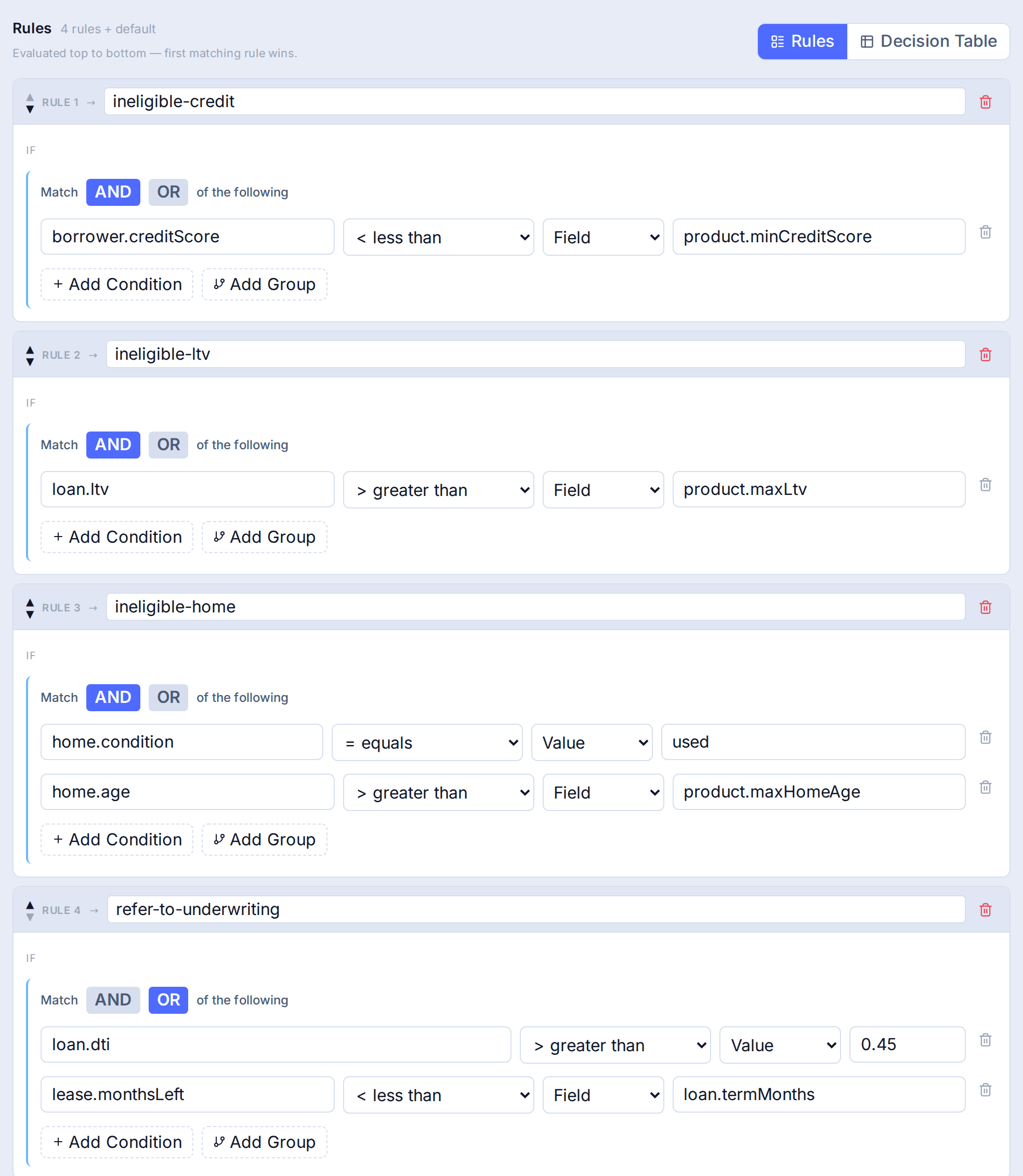
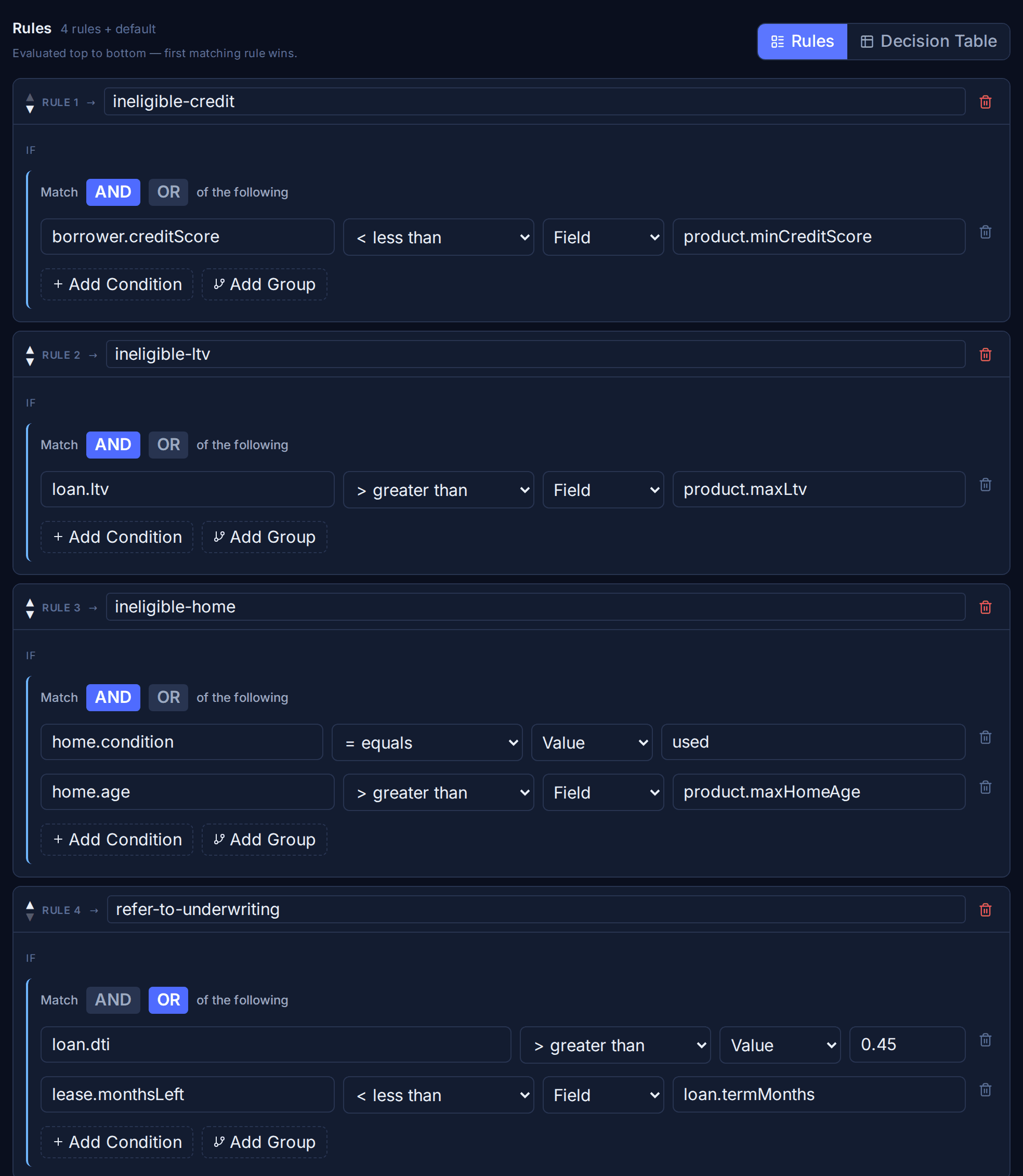
Captured from the running product: a chattel eligibility policy with four outcomes and a default.
Calculations and reference data
Policy decisions depend on numbers, and numbers are where automation most often goes wrong. Miji calculates with exact decimal arithmetic rather than floating point, and includes finance functions for payments and present value. Reference data — rate sheets, limit grids, fee tables — lives in lookup tables. A matrix lookup selects a row by several columns at once, the most specific matching row wins, and rows can carry effective dates so a new sheet takes effect on its date.
Human review, built in
Most policies have cases a person should decide. In Miji that is part of the workflow, not a separate tool: an approval gate routes the case to a group, the gate resolves when any one, all, or a majority of approvers agree, and the case waits in a work queue with what the policy flagged. The approval is recorded against the run, next to everything the workflow did before and after.
Workflow building blocks
| Step | Use it to |
|---|---|
| Trigger | Start a run from a form, webhook, schedule or API call. |
| Connector | Call an external system — a CRM, a credit bureau, your own API. |
| Rule / condition | Branch on your versioned policy. |
| Lookup table | Read a rate, a limit or a mapping from reference data. |
| Calculation | Compute values exactly and set variables. |
| AI step | Summarise, classify or draft, with your model and key. |
| Human approval | Pause for a person or a group to decide. |
| Loop, batch, parallel | Iterate over items, fan out large sets, run branches together. |
| Sub-workflow | Reuse another workflow as a step. |
| Files | Generate or store documents against the case. |
Test a change before it goes live
A rule change is a policy change, so Miji lets you find out what it would do first. Replay one recorded case on the draft and compare it with the original; batch-replay thousands of past cases and see every decision that would move; shadow the draft beside live traffic without it acting; keep scenario sets of cases that must keep passing; and A/B test it on a capped share of real traffic with guardrails. See policy testing.
Why one platform instead of a rules engine plus a workflow tool
- One version history. The rule, the workflow that uses it, and the deployment are versioned together, so you always know which policy was live.
- One record. Inputs, rule version, calculations, approvals and outcome sit on one audit trail instead of three systems' logs.
- One place for business users. Policy owners edit rules and tables without touching integration code.
- No glue code. There is no custom service between the rules engine and the workflow to maintain.
On the roadmap
Not available today. Listed so you can see where this is going — the capabilities above are the ones you can use now.
Draft, approve, publishBuilding
Require a second person to approve a policy change before it takes effect.
Decision noticesBuilding
Generate outcome documents directly from the decision record.
Bring a policy document; we'll show it running as rules and a workflow.
Book a demoFrequently asked questions
What software can turn business policies into automated workflows?
Decision automation platforms such as Miji. Miji turns a written policy into versioned rules and decision tables, adds the calculations and data lookups the policy depends on, routes the cases it cannot decide to people, and records which policy version made each decision.
What software can automate complex business rules and decision workflows?
Decision automation platforms, which combine a rules engine with the workflow around it. In Miji, rules can compare fields and expressions, limits live in effective-dated tables, the workflow handles data, loops, parallel branches and sub-workflows, and cases the rules refer go to people through approval gates.
What are the best platforms for building configurable decision workflows?
Platforms where the policy is configured rather than coded, versioned, and applied inside a workflow that can route cases to people. Miji is one: its AI drafts the workflow for review, policy owners edit rules and tables, and every decision records the rule version. Enterprise suites such as Pega and FICO Platform offer configurable decisioning at larger scale.
Can a rule compare two fields instead of a fixed number?
Yes. A condition in Miji can compare a field with a literal value, with another field, or with an expression evaluated at run time. That lets limits live in tables your team edits rather than inside the rule.
How do we test a policy change before it goes live?
Test a rule against sample inputs in the editor, then use the Lab: replay recorded cases on the draft, batch-replay thousands of past cases to see every decision that would change, shadow the draft beside live traffic without it acting, and run scenario sets of cases with expected outcomes. A separate test environment and pinned production deployments keep the release itself controlled.
Who can edit rules?
Access is role-based: you decide who may author a policy, who may approve decisions, and who may only read. Every change creates a new fingerprinted version.